Building a fast website is no longer only a development goal. Website performance,
technical SEO, mobile usability, and the way a page delivers its content can all
influence the quality of the user experience. Next.js provides
developers with several rendering and performance features that can be used to
create modern websites that are easier to optimize for search engines and users.
However, simply choosing Next.js does not automatically make a website fast or
SEO-friendly. The application still needs the right architecture, rendering strategy,
metadata, optimized assets, and technical SEO configuration.
In this guide, we explain how to create a fast and SEO-friendly website
using Next.js. We cover rendering methods, image and font optimization,
Core Web Vitals, metadata, structured data, internal linking, clean URLs, and common
technical mistakes. We also explain how businesses can combine Next.js development
with a broader SEO strategy to build a website that is technically strong and
capable of attracting organic traffic.
Why Website Speed and SEO Matter
![Website loading speed and SEO performance | Digitizer]()
Website performance directly affects how users interact with a page. Visitors are
more likely to leave when a page takes too long to display its main content or
responds slowly to interaction. Performance is particularly important on mobile
devices and slower networks, where large images, unnecessary JavaScript, and
inefficient server requests can become significant bottlenecks.
SEO also involves much more than placing keywords on a page. Search engines need
to understand the content, discover URLs, access important resources, and determine
which version of a page should appear in search results. A technically optimized
Next.js website can provide a strong foundation for these requirements, but
technical implementation must be combined with useful content, logical internal
linking, and a clear site structure.
What Is Next.js?
Next.js is a React framework used to build production-ready web applications and
websites. It provides features for routing, rendering, server-side functionality,
image optimization, metadata management, and application performance. Instead of
requiring every page to depend entirely on browser-side JavaScript, Next.js allows
developers to choose how different parts of an application should be rendered.
This flexibility is particularly useful for websites that depend on organic search.
Content that needs to be available to search engines can be rendered on the server
or generated ahead of time, while interactive elements can still use client-side
functionality where it is actually required. The result can be a more efficient
balance between SEO, performance, and user experience.
React.js vs. Next.js for Website Performance
![React.js vs Next.js website performance | Digitizer]()
React is primarily a library for building user interfaces, while Next.js provides
a broader framework around React applications. A React project can be configured in
many different ways, but developers often need to add separate solutions for
routing, rendering, metadata, image handling, and other production requirements.
Next.js provides an integrated approach to these areas. Depending on the project,
developers can use static generation, server rendering, or client-side rendering.
This means a website can serve important content efficiently while still providing
interactive features where they are necessary.
The important point is that Next.js is not automatically faster than every
React application. Performance depends on how the application is designed.
Excessive client-side JavaScript, large images, inefficient API requests, third-party
scripts, and poor caching can make a Next.js website slow despite using a modern
framework.
SEO Benefits of Next.js
![SEO benefits of Next.js | Digitizer]()
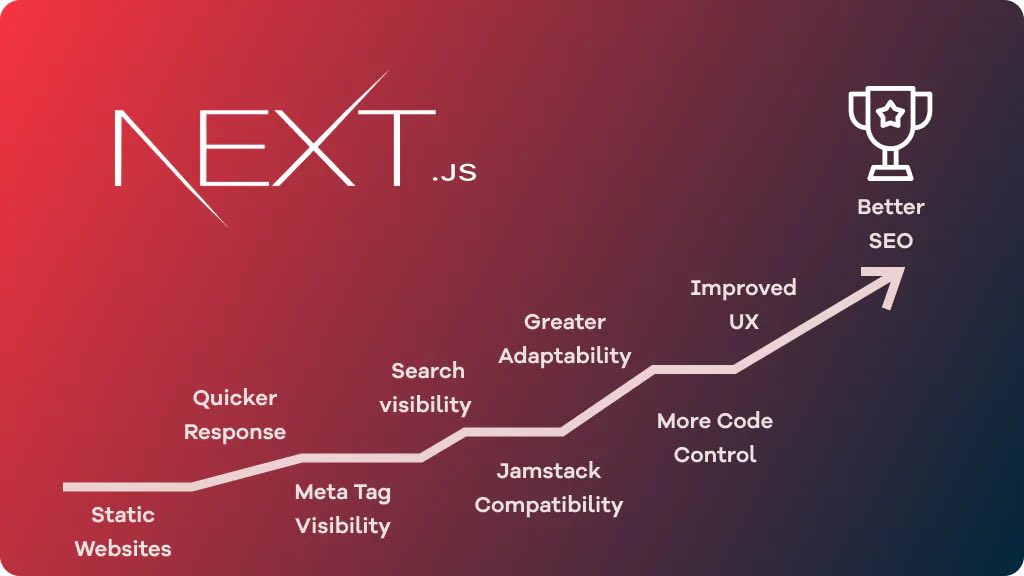
One of the main advantages of Next.js for SEO is its flexibility in rendering
content. Important pages can be generated before a user requests them or rendered
on the server when dynamic information is required. This can make the initial HTML
more useful for users and search engine crawlers.
Next.js also provides tools for managing page metadata. With modern Next.js
applications, developers can use the Metadata API to define titles,
descriptions, canonical URLs, Open Graph information, and other metadata. Correct
metadata helps search engines understand the purpose of each page and can improve
how pages appear when shared or displayed in search results.
Another advantage is the availability of image optimization features. Using the
next/image component correctly can help developers serve images in
appropriate sizes and formats while reducing unnecessary network usage. Images
should still be properly sized, described with useful alternative text, and
configured according to their position and importance on the page.
Next.js can also support better performance through server components, code
splitting, dynamic imports, caching, and efficient routing. These features do not
guarantee good Core Web Vitals, but they give developers more control over how
resources are delivered to the browser.
How to Build a Fast Website with Next.js
Creating a fast Next.js website starts with choosing the appropriate rendering
strategy. Pages that contain stable information can often benefit from static
generation or caching, while pages containing frequently changing information may
require server-side rendering or another dynamic approach. The goal is not to use
one rendering method everywhere, but to select the method that matches the content
and business requirements.
Image optimization is another important part of performance.
Large images can become one of the biggest resources on a webpage, particularly
when the main visual element is responsible for the Largest Contentful Paint (LCP).
Developers should use appropriately sized images, avoid unnecessarily large files,
provide meaningful alt text, and load non-critical images only when needed.
JavaScript optimization is equally important. A website should
not send large amounts of client-side JavaScript when the browser does not need it.
Server Components, dynamic imports, code splitting, and removing unnecessary
dependencies can help reduce the amount of JavaScript that must be downloaded,
parsed, and executed.
Font optimization should also be considered. Too many font files,
unnecessary font weights, or poorly configured loading behavior can delay text
rendering and contribute to layout instability. Using only the fonts and weights
that the design actually requires can reduce unnecessary network requests.
Finally, caching and content delivery should be considered as part of the
architecture. Static resources should be cached appropriately, while dynamic data
should use a strategy that minimizes unnecessary server work and repeated requests.
A well-designed caching strategy can significantly improve response times for
returning visitors and users in different locations.
How to Improve Core Web Vitals in Next.js
Core Web Vitals are user-focused performance metrics used by Google to evaluate
important aspects of page experience. The current Core Web Vitals focus on
Largest Contentful Paint (LCP),
Interaction to Next Paint (INP), and
Cumulative Layout Shift (CLS).
To improve LCP, developers should identify the largest visible
content element and make sure it is delivered quickly. Optimizing hero images,
reducing server response time, avoiding unnecessary render-blocking resources, and
improving caching can all contribute to a better result.
To improve INP, the amount of JavaScript executed in the browser
should be carefully controlled. Long-running tasks, excessive event handlers,
unnecessary third-party scripts, and large client-side components can make
interactions feel slow.
CLS is strongly connected to visual stability. Images and other
media should have predictable dimensions, dynamic elements should not unexpectedly
push existing content down the page, and fonts should be loaded in a way that
minimizes layout changes.
Next.js SEO Best Practices
Performance alone cannot create a successful SEO strategy. Every important page
should have a unique and descriptive title, a useful meta description, a logical
heading structure, and content that satisfies the search intent behind the target
query.
Metadata should accurately describe the page. In modern Next.js
projects, the Metadata API can be used to manage titles, descriptions, canonical
URLs, robots directives, and social sharing information. Each indexable page
should have metadata that reflects its actual content rather than relying on
duplicated default values.
Structured data can provide search engines with additional
information about a page. Article, BreadcrumbList, Organization, Product, and
other schema types should only be used when they accurately represent the visible
content and purpose of the page. Structured data should never be treated as a
substitute for useful content.
Internal linking is another important part of technical SEO.
Related pages should be connected using descriptive anchor text so that users and
search engines can understand the relationship between different sections of the
website. For example, a Next.js development article can naturally link to relevant
web development and SEO service pages.
A clean URL structure also makes websites easier to understand.
URLs should be descriptive, stable, and consistent. Avoid unnecessary parameters
or meaningless URL patterns when a clearer structure is possible.
SSR, SSG, and CSR: Which One Should You Use?
Choosing the right rendering method depends on the type of content and how often
that content changes. There is no single rendering strategy that is best for every
Next.js page.
|
Rendering Method
|
Best For
|
SEO Potential
|
Performance Potential
|
|
Static Generation
|
Blogs, landing pages, documentation, stable content
|
High
|
Very High
|
|
Server-Side Rendering
|
Dynamic pages and frequently changing content
|
High
|
High when optimized
|
|
Client-Side Rendering
|
Highly interactive application interfaces
|
Depends on implementation
|
Depends on JavaScript workload
|
For content-focused websites, static generation or efficiently cached server
rendering can provide an excellent combination of SEO accessibility and
performance. Client-side rendering is still useful for interactive components,
dashboards, and application features, but important SEO content should not depend
unnecessarily on large amounts of browser-side JavaScript.
Technical SEO Checklist for a Next.js Website
Before publishing a Next.js website, developers should review the technical
foundation of the project. A practical checklist includes:
- Unique title and meta description for important pages
- Correct canonical URLs
- Indexable HTML content
- Responsive mobile design
- Optimized images and meaningful alt text
- Fast server response and efficient caching
- Good LCP, INP, and CLS performance
- XML sitemap containing important indexable URLs
- Correct robots.txt configuration
- Logical internal linking
- Structured data where it accurately represents the page
- Clean and stable URL structures
Common Next.js SEO and Performance Mistakes
One common mistake is assuming that using Next.js automatically makes a website
fast. Framework choice is only one part of performance. Large images, excessive
JavaScript, inefficient API requests, third-party scripts, and poor caching can
still create significant performance problems.
Another mistake is using client-side rendering for content that needs strong
organic visibility without considering how the page content is delivered. Important
content should have an appropriate rendering strategy so that it can be reliably
accessed and understood.
Developers should also avoid duplicated metadata, incorrect canonical URLs,
missing sitemap configuration, broken internal links, and poorly structured
headings. These issues may not always prevent crawling, but they can make it harder
for search engines to understand and evaluate the website.
Finally, performance should be measured rather than assumed. Tools such as
Lighthouse and Google Search Console can help identify performance and indexing
issues. Testing should be performed on real pages and realistic devices instead
of relying only on local development performance.
How Digitizer Approaches Next.js SEO
At Digitizer, the performance of a website is considered together
with its technical SEO structure and business goals. A fast website should not only
load quickly; it should also provide search engines with accessible content, clear
metadata, logical internal links, and a structure that can support long-term
organic growth.
For a Next.js project, the optimization process can include reviewing rendering
strategies, page structure, images, JavaScript usage, metadata, structured data,
internal linking, sitemap configuration, mobile performance, and Core Web Vitals.
The exact approach depends on the website architecture and the type of content
that needs to rank.
Businesses that want to improve their organic visibility should therefore treat
Next.js development and SEO as connected processes. A technically strong
foundation makes it easier to publish useful content, improve user experience,
and build a website that can grow with the business.
Conclusion
Next.js can be an excellent foundation for building fast and SEO-friendly websites,
but the framework itself is not a guarantee of search visibility. The best results
come from combining the appropriate rendering strategy with optimized images,
efficient JavaScript, reliable metadata, structured data, internal linking,
mobile-friendly design, and continuous performance monitoring.
When these technical decisions are combined with useful, original content and a
clear SEO strategy, a Next.js website can provide a strong foundation for long-term
organic growth. The key is to optimize the entire experience rather than focusing
on a single ranking factor or development feature.
Sources
The following official documentation can be used for further technical reference: